

Kirsten Johnson, Founder of Reverie
Here's what every business owner should know about a convincing Google phishing scam.
Most of us know to be cautious of suspicious emails. But what happens when a phishing message appears inside an actual security notification from Google?
A convincing phishing tactic has been circulating that makes fraudulent warnings especially difficult to recognize. The surprising part? The email itself may genuinely come from Google, while the warning inside was created by a scammer.
Here's how it works, what to watch for, and how to protect your business.
How Does This Google Phishing Scam Work?
This particular scam takes advantage of Google's app password security notifications.
An app password is a special code that allows certain older applications or devices to access a Google Account.
Here's how scammers exploit this feature:
A scammer creates an app password on a Google Account they control.
They enter a threatening message and suspicious link into the app password's name.
Google generates a legitimate security notification containing that name.
The scammer forwards the notification to an unsuspecting recipient.
Because Google generated the original notification, the email can appear authentic, including its branding, sender information, and email authentication.
The problem isn't necessarily the email's authenticity. It's the fraudulent message embedded inside it.
This technique has been documented in actual phishing incidents, including an October 2026 report by cybersecurity researchers at PlayCISO.
What Does the Fake Google Security Alert Look Like?
One example uses the familiar Google security notification titled:
"App password created to sign in to your account."
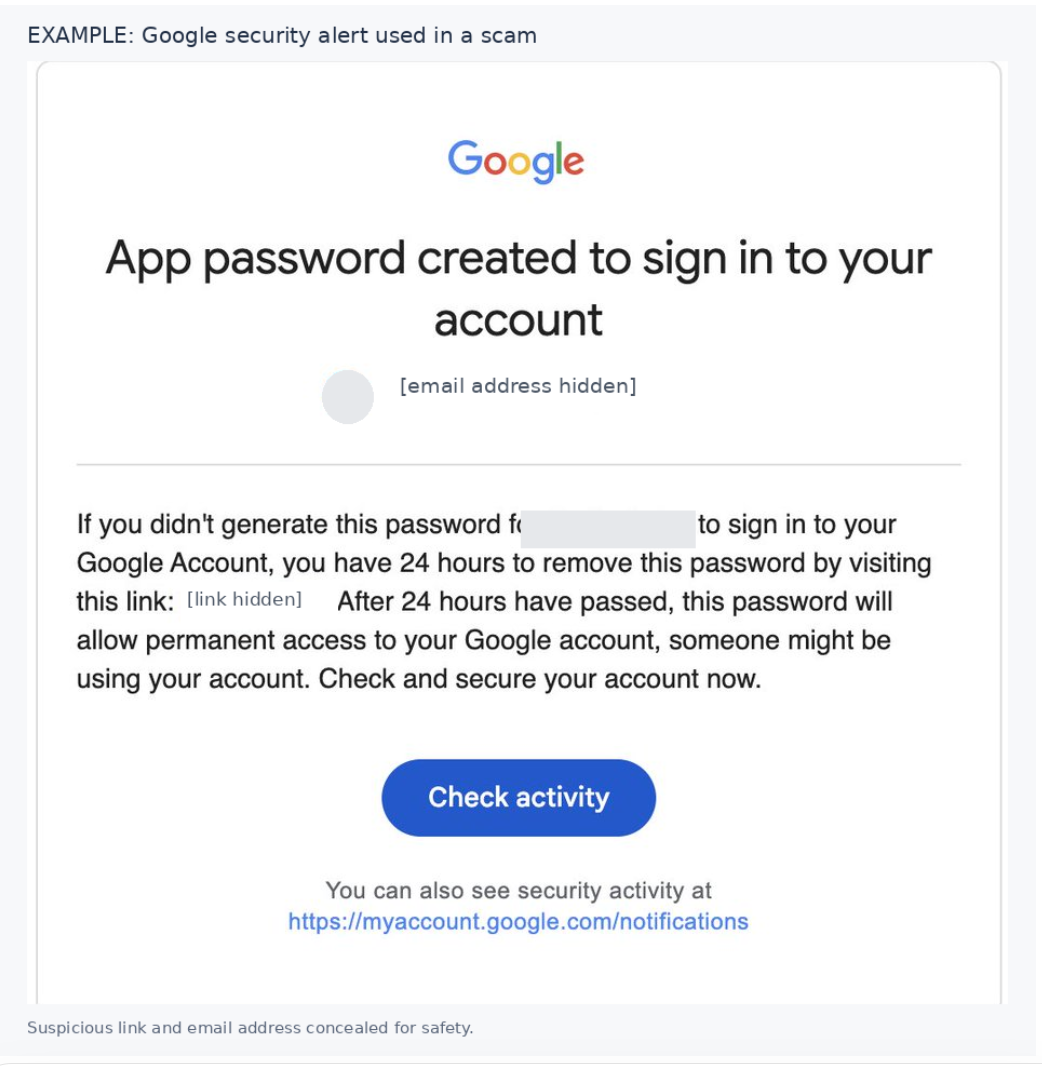
Example of a Google app password security notification containing a fraudulent 24-hour account access warning.
The message warns that someone could gain permanent access to your Google Account unless you remove a password within 24 hours.
It then directs you to a suspicious link to resolve the supposed emergency.
That 24-hour warning is false.
Google allows account owners to revoke app passwords. The claim that an app password will automatically grant unavoidable, permanent access after 24 hours is designed to create panic.
Screenshot: Example of a Google security notification containing a fraudulent 24-hour warning and suspicious link.
Why Should Business Owners Pay Attention?
Your Google Account may connect to several important parts of your business, including Gmail, Google Drive, Google Business Profile, Google Ads, and other services.
That makes Google-related security warnings particularly concerning.
Scammers understand this. By creating a sense of urgency around your business accounts, they're hoping you'll react before verifying whether the warning is legitimate.
And because some of these messages originate from Google's actual notification system, checking the sender's email address alone may not be enough.
An authentic-looking security email doesn't automatically mean its instructions are trustworthy.
What Should You Do If You Receive a Suspicious Google Security Alert?
The good news is that protecting yourself doesn't require complicated technical knowledge. A few simple habits can make a meaningful difference.
1. Don't Click Suspicious Links
Be especially cautious of shortened URLs, urgent deadlines, and requests for passwords or personal information.
Even when a notification looks legitimate, avoid using its links to investigate suspicious account activity.
2. Check Your Google Account Directly
Instead of following a link in the email, open a new browser tab and visit:
https://myaccount.google.com/notifications
This is Google's official page for reviewing recent account security activity.
You can also review your devices and available app password settings directly within your Google Account.
3. Report the Suspicious Email
If you're using Gmail:
Open the suspicious email.
Select the three-dot menu next to Reply.
Choose Report phishing.
If your business uses Google Workspace, notify your administrator or designated IT support contact as well.
4. Secure Your Account If You Notice Unfamiliar Activity
Receiving one of these emails doesn't automatically mean someone has accessed your account.
However, if you discover unfamiliar security activity, devices, or app passwords, take action.
Follow Google's official instructions for securing a compromised account. If you entered your password on a suspicious website, change it directly through your Google Account.
5. Share This Information With Your Team
Anyone who manages your business email or Google-connected accounts should understand how this scam works.
A quick conversation with your team could prevent someone from clicking a fraudulent link during a busy workday.
Does Receiving This Email Mean Your Google Account Has Been Hacked?
Not necessarily.
In the scam described above, the attacker can generate the misleading notification using a Google Account they control. Receiving the forwarded notification does not, by itself, establish that your account has been compromised.
The safest response is to verify your own account activity directly rather than relying on the email.
A Simple Reminder: Verify Before You Act
Technology continues to evolve, and unfortunately, so do the methods scammers use to appear trustworthy.
But protecting your business often comes down to a simple principle: When something feels urgent, verify it before taking action.
At Reverie Creative Agency, we believe in helping business owners make informed decisions about the tools and platforms they rely on. That includes sharing important information when we see something worth paying attention to.
If you receive an unexpected Google security notification, don't panic. Check your account directly, report suspicious messages, and encourage your team to do the same.
A little awareness can go a long way toward protecting your business.
Reverie is an Arizona website design, SEO, and Google Ads agency helping small businesses grow online in Gilbert, Queen Creek, Mesa, Chandler, and the East Valley.